Mostly research-based. We did run Ollama with a small model on our own Linux server (CPU only, no graphics card); that output is shown below. We haven't tested the Mac, Windows or phone steps or the other apps yet. Facts come from official pages, last checked Oct 15, 2026.
Free plans and trials as of Oct 2026; some links may earn us a commission.
The short version
Why local means privacy (and where it stops)
With a cloud chatbot, what you type is sent to the company's servers. With a local model, the AI runs on your processor and memory. After you download the model file, your prompts, answers and any documents you load stay on your device. LM Studio, for example, says it can “operate entirely offline” once you have model files.
Limits to know:
- The download itself comes from the internet (the app's model library or Hugging Face).
- Some apps have optional cloud features, usage stats or update checks; look in settings if you want them off.
- Your device's own security still matters: anyone with access to your computer can read your chat history.
- Local models don't search the web unless you add that, so their knowledge stops at their training date.
Not sure what your computer can handle? Use our free “What can my computer run?” checker →
What hardware do you need?
The rule of thumb: the model file must fit in memory with a few GB to spare. On a Mac, that's the unified memory (RAM). On a Windows or Linux PC with a graphics card, it's the card's video memory (VRAM); models can also run on the main processor and RAM, just more slowly.
| Memory (Mac RAM or PC GPU VRAM) | Models that fit (download size, per Ollama) | What to expect |
|---|---|---|
| 8 GB | Qwen 3.5 4B (3.3 GB), Gemma 4 E2B (4.6 GB), Llama 3.2 3B (2.0 GB) | Quick questions, summaries, simple writing |
| 16 GB | Qwen 3.5 9B (6.6 GB), Gemma 4 12B (7.7 GB), DeepSeek-R1 8B (5.2 GB); gpt-oss 20B (14 GB) is a tight fit | Good everyday chat, light coding, reading documents |
| 24–32 GB | Gemma 4 26B (16 GB), Qwen 3.5 27B (17 GB), Mistral Small 3.2 24B (15 GB), gpt-oss 20B | Noticeably smarter; closer to older cloud models |
| 48–64 GB+ | Qwen 3.6 35B (23 GB), DeepSeek-R1 70B (43 GB), gpt-oss 120B (65 GB, needs 80 GB+) | Enthusiast tier: big models, slower |
Sizes are Ollama's default downloads (usually 4-bit compressed versions), checked Oct 15, 2026. “Fits” is our rule of thumb, not a guarantee; long documents need extra memory.
- Mac: Apple Silicon (M1 or newer). LM Studio needs macOS 14+ and recommends 16 GB+; 8 GB Macs work with smaller models. Intel Macs aren't supported by LM Studio.
- Windows: LM Studio recommends 16 GB RAM and at least 4 GB of dedicated VRAM, and needs a CPU with AVX2 (most from the last decade). It also supports Snapdragon X (ARM) laptops.
- Linux: LM Studio ships as an AppImage (Ubuntu 20.04+); Ollama has a one-line installer.
- Phones: PocketPal AI says you need 6 GB+ RAM for small models and 8 GB+ for better ones. Google's AI Edge Gallery needs Android 12+ or iOS 17+.
Beginner apps (as of Oct 2026)
| App | Platforms | Why pick it | Cost |
|---|---|---|---|
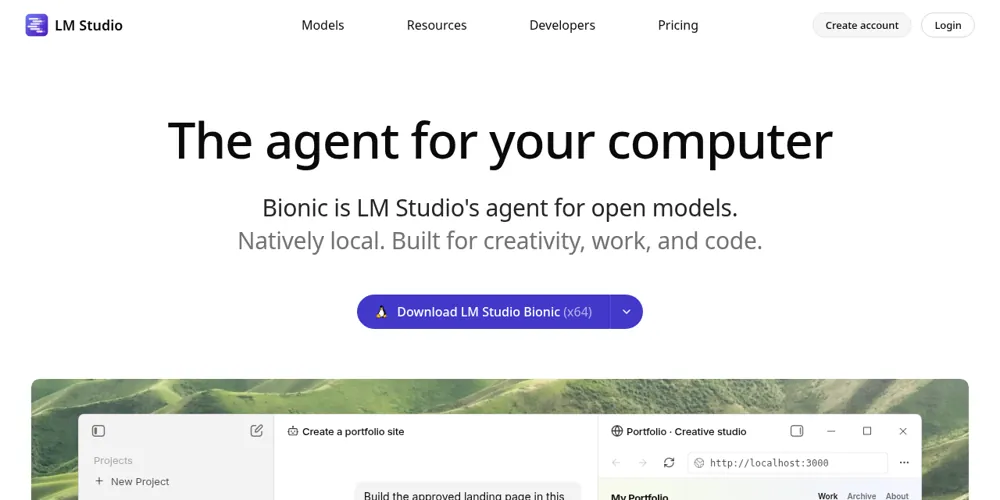
| LM Studio | Mac (Apple Silicon), Windows, Linux | Friendliest point-and-click app; search and download models inside it. Version 0.4.26 per its changelog. | Free |
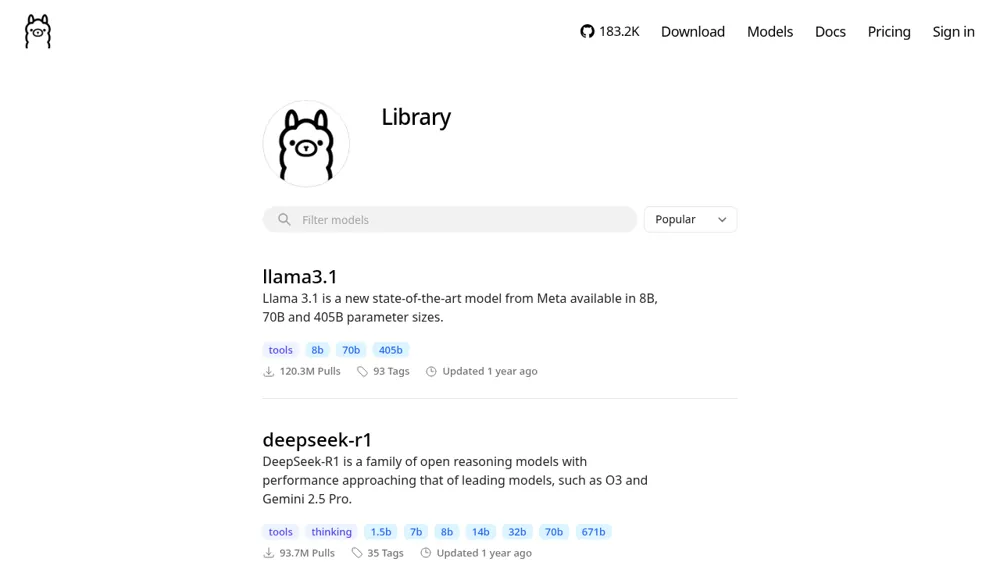
| Ollama | Mac, Windows, Linux | Hugely popular; one command to download and chat; many other apps plug into it. | Free for local use |
| Jan | Mac, Windows, Linux | Open-source ChatGPT-style app that runs offline. | Free, open source |
| GPT4All | Mac, Windows, Linux (x64) | Simple app from Nomic; can chat with your local documents. Minimum 16 GB RAM (8 GB for 3B models), per its GitHub. | Free, open source |
| PocketPal AI | Android, iPhone | Download small open models to your phone; works offline. | Free, open source |
| Google AI Edge Gallery | Android 12+, iOS 17+ | Google's app for running Gemma models on your phone. | Free, open source |
Recommended open models (Oct 2026)
- Qwen 3.5 / 3.6 (Alibaba): strong all-rounders from 0.8B to 122B; Qwen 3.6 focuses on coding and agent tasks, per Ollama's listing.
- Gemma 4 (Google): E2B and E4B for laptops and phones, 12B for mid-range, 26B/31B for big machines.
- gpt-oss (OpenAI): OpenAI's open-weight models: 20B (14 GB) and 120B (65 GB).
- Llama 3.2 (Meta): tiny 1B/3B models that run almost anywhere. Meta's newest Muse models aren't confirmed as downloadable (not verified).
- Mistral Small 3.2 (24B): good at following instructions, per Ollama's listing.
- DeepSeek-R1: “reasoning” models that think step by step, 1.5B to 671B.
Licences differ: most of these allow personal use, but check each model's licence before using it in a business.
Platform guides: AI on Macs (Apple Intelligence, unified memory) · AI on Windows PCs (Copilot, Copilot+ PCs).
10-minute setup: Mac
- Check you have an Apple Silicon Mac (Apple menu → About This Mac shows “M1” or later) and macOS 14 or newer.
- Download LM Studio from lmstudio.ai (official site only) and drag it to Applications.
- Open it, go to the model search (Discover), and pick a small model: Qwen 3.5 4B or Gemma 4 E2B on 8–16 GB.
- Click download (a few GB; this is the only step that needs internet).
- Open a new chat, choose the model, and ask: “Explain what you are in two sentences.”
- Optional: turn Wi-Fi off and ask again. It should still answer.
Prefer Ollama? Download the Mac app from ollama.com, then open Terminal and type ollama run qwen3.5:4b.
10-minute setup: Windows
- Check your memory: Settings → System → About (RAM), and Task Manager → Performance → GPU (dedicated memory).
- Download LM Studio or Ollama for Windows from the official site and run the installer.
- LM Studio: search for Qwen 3.5 4B (or Gemma 4 12B if you have a 12 GB+ graphics card), download, and start a chat.
- Ollama: open PowerShell and type
ollama run qwen3.5:4b. The first run downloads the model, then you can chat. - Type
/byeto exit Ollama's chat.
10-minute setup: Linux or Intel Mac
- Install Ollama: on Linux run the one-line installer from ollama.com/download; on an Intel Mac download the Mac app there. (LM Studio also offers a Linux AppImage, but doesn't support Intel Macs.)
- Open a terminal and type
ollama run qwen3.5:4b. The first run downloads the model. - Type a question and press Enter. On older or CPU-only machines, try a smaller model like
qwen3.5:0.8b.
What we actually ran (Oct 15, 2026)
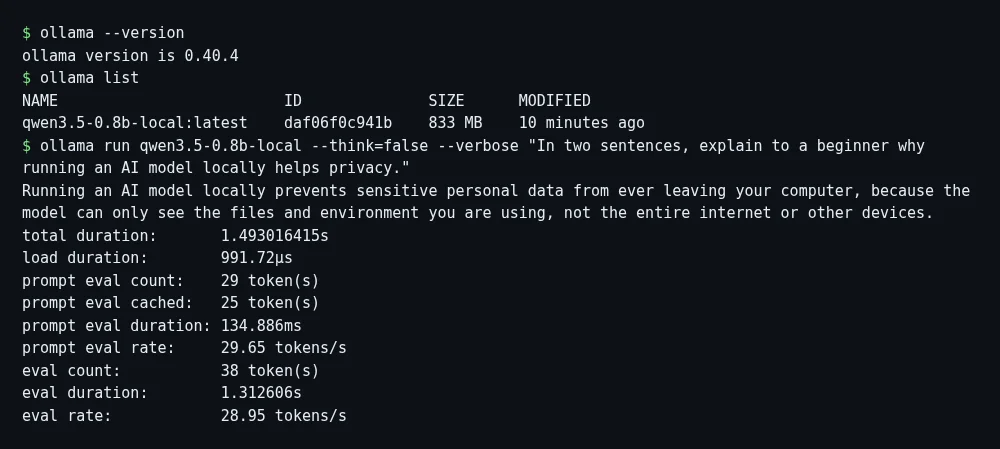
On our Linux server (8 CPU cores, no graphics card), we installed Ollama 0.40.4 and ran Qwen 3.5 0.8B, the smallest Qwen 3.5. Our server's network blocked Ollama's own download servers, so we downloaded Qwen 3.5 0.8B as a GGUF file from Hugging Face (ggml-org) and imported it into Ollama. It answered in about 1.5 seconds at about 29 tokens (word pieces) per second. The answer was sensible but simple, which is typical for a model this small.
Local vs cloud: honest tradeoffs
| Local | Cloud (ChatGPT, Gemini, Claude) | |
|---|---|---|
| Privacy | Stays on your device | Sent to the company's servers |
| Quality | Good for everyday tasks; weaker on hard reasoning | Best available models |
| Speed | Depends on your hardware | Usually fast |
| Cost | Free (plus electricity and your hardware) | Free tiers; $8–$20+/month for more |
| Web search, agents | Not built in | Built in |
Safety tips
- Download apps only from official sites (ollama.com, lmstudio.ai, jan.ai, nomic.ai) or the official app stores. Fake “AI app” downloads are a common malware trick.
- Get models from the app's built-in library or well-known Hugging Face publishers.
- A local model can still be wrong; double-check anything important.
- Keep the app updated, and don't expose its local server to the internet unless you know what you're doing.
FAQ
Is it really free? The apps above are free for personal local use, and open models are free to download.
Will it slow my computer down? While it's answering, yes, it uses a lot of memory and processor. Close it when you're done.
Can I use it for AI agents? Partly. Some agent tools can connect to Ollama or LM Studio, but local models are less reliable at multi-step tasks. See our agentic AI hub.
Which model is “best”? The biggest one that fits your memory comfortably. Start small and move up.
Does it work on an old Intel Mac? LM Studio says Intel Macs aren't supported; try a cloud chatbot instead.
More: AI models explained · Best free AI models · Agentic AI
Free plans and trials as of Oct 2026; some links may earn us a commission.
Sources
- Ollama: download (Mac, Windows, Linux): last checked Oct 15, 2026
- Ollama model library: last checked Oct 15, 2026
- Ollama: Gemma 4 sizes: last checked Oct 15, 2026
- Ollama: Qwen 3.5 sizes: last checked Oct 15, 2026
- Ollama: Qwen 3.6 sizes: last checked Oct 15, 2026
- Ollama: gpt-oss sizes: last checked Oct 15, 2026
- Ollama: Llama 3.2 sizes: last checked Oct 15, 2026
- Ollama: Mistral Small 3.2 sizes: last checked Oct 15, 2026
- Ollama: DeepSeek-R1 sizes: last checked Oct 15, 2026
- LM Studio: system requirements: last checked Oct 15, 2026
- LM Studio: changelog (0.4.26): last checked Oct 15, 2026
- Jan (open-source desktop app): last checked Oct 15, 2026
- GPT4All: system requirements (GitHub): last checked Oct 15, 2026
- PocketPal AI on Google Play: last checked Oct 15, 2026
- Google AI Edge Gallery (GitHub): last checked Oct 15, 2026
- Hugging Face: ggml-org/Qwen3.5-0.8B-GGUF (model we ran): last checked Oct 15, 2026
Prices and plans change often. Always confirm on the official site before you buy.